顯示具有 febon198 標籤的文章。 顯示所有文章

2020年4月28日 星期二

How to choose FEBON UVC HDMI capture card?


USB2.0 FEBON168 UVC HDMI GRABBER CARD

USB3.0 FEBON178 UVC HDMI GRABBER CARD (PCBA only)


USB3.0 FEOBN198 UVC HDMI GRABBER CARD

USB3.0 FEBON169 UVC HDMI Grabber card


There are many parameter characteristic for your choice as below

Price , video latency,  output resolution and frame rate,  video scaler distortion , Power , dimension size,  USB3.0 compatible. ...


Video scaler distortion:

we wish the video do not have any distortion.

But, the hdmi have many kind of resolution and UVC output also have many kind of resolution.

Some software can not choose the uvc output resolution.  

if we do not add the video scaler ic , it do not easy to use

because hdmi input resolution/ frame rate must be equal the UVC output resolution and frame rate

for example:

hdmi source: 1920x1080p 60fps

uvc hdmi capture card have  1920x1080p , 1280x720p  , 720x480p uvc output.

SKYPE always get  1280x720p uvc

For this case,  hdmi input  do not equal uvc output.

if we do not add the video scaler ic,  it do not have any video.


After add the video scaler ic , it become the Independence between  HDMI INPUT and UVC output.


But, it will occur the video scaler distortion

it is a trade off  !!

2019年4月25日 星期四

FEBON HDMI to HDMI scaler convert box ( convert all resolution & frame rate into 1920x1080p 60fps)


FEBON HDMI to HDMI convert box can let all of hdmi input resolution &frame rate become single one resolution output

it is hdmi 1080i to 1080p (i to p ) converter box

interlace to progressive converter adapter


Two main function
1.HDMI TO HDMI  Resolution& frame frame rate convert function 
2. HDMI Resolution and frame rate test and detect 


2019年4月12日 星期五

USB3.0 FEBON198 UVC HDMI GRABBER CARD for windows / mac lives stream application.


USB3.0 FEBON198 UVC HDMI capture card have many use limitation  as below


1.  OS must be Windows 8.1  or MA OSX

    it can not work on  Windows 7, xp, ....


2. USB3.0 must be  XHCI

   it can not work on  eHCI


3. HDMI video source must be  progressive as below

   1920x 1080p 60 /50/30/24 fps

   1366x768  60fps

   1280x720  60fps/50fps


It can work on WINDOWS 8.1 Wirecast / OBS  / Vmix     and MAC OSX  Wirecast / Sportscode


The user will meet the hdmi input resolution /frame rate do not equal  uvc output resolution / frame rate


I use the  WINDOWS VMIX  to the demo .


USB3.0 FEBON198 UVC HDMI GRABBER CARD work on Windows VMIX


1.hdmi input 1920x1080p 60fps and work on windows  VMIX


  you must choice the uvc output to be as 1920x1080p 60fps

if your uvc output is not 1920x1080p 60fps, it can not work. 


2018年12月18日 星期二

Two USB3.0 UVC capture card ( HDMI capture card / SDI capture card) work on MAC together at the same time


USB3.0 FEBON199 SDI grabber card and  USB3.0 FEBON198 HDMI grabber card work on MAC at the same time.


HDMI soure is from iPad  lightning output.

SDI source is from  HD-SDI CCTV  camera.


SDI source is  1280X720P 60FPS.

HDMI source is 1920x1080p 60fps.


2018年12月11日 星期二

Use Chromecast with USB UVC grabber card is as live video source for Google hangouts / SKYPE


Chromecast can let Android become wireless live stream and mirror to TV.


I can use  "Chromecast+ FEBON UVC hdmi grabber card" become the live video source for  Google hangouts / skype.


 By wireless chromecast mirror, Android can mirror  to MAC air  and as the Google hangouts video source


HDMI output of  chromecast have "HDCP".

if you want to use USB2.0 FEBON168 USB UVC  hdmi grabber card to let the video into your pc,

you may add the "HDCP disable" box.

After you add the " HDCP disable" box, the hdmi will be without HDCP.


USB2.0 FEBON168 UVC HDMI GRABBER CARD
http://febon.blogspot.com/2013/10/febon168-uvc-usb-hdmi-grabber-card-user.html


2018年9月2日 星期日

USB3.0 FEBON198 UVC HDMI capture card compitble MAC SKYPE / GOOGLE Hangouts live stream.


FEBON198 USB3.0 UVC HDMI caputure card is compatible for MAC live stream  application.


It is real orignal output ( no video scale process) and almost no latency.


The video input and output is as below

1920x1080p 60 / 50 /30 /24 fps

1366x768p 60 /50 fps

1280x720p  60 / 50 fps


If you choice the 1920x1080p uvc output, it means the hdmi source must be 1920x1080p

 DO not do more video scale process.


We just want to provide you the "real orignal " HDMI source!!


we can use MAC wirecast to control the UVC ouput resolution what you want.


1. MAC SKYPE Application


This video clip will show you as below

HDMI source is iPad output and connect with USB3.0 HDMI grabber card.


we use the MAC SKYPE to communicate

ANDROID  SKYPE  call the MAC skype.


2018年8月24日 星期五

免驅動程式USB3.0 HDMI 擷取卡開賣了


 USB3.0 FEBON198 UVC hdmi 擷取卡
 目前有7ea工程樣品


 開賣時間: 2014/08/22

適用對象:
1.將電腦當電動玩具螢幕的使用者
2.工業檢測
3.對於影像延遲非常在意的朋友
4.mac 影像使用的用戶 (如vj )
5.會寫影像方面的軟體工程師(如windows directshow等等)


不適合對象
1.打算拿來做windows skype使用
(網路直播如 google hangouts, ustream 是可以使用的)


usb3.0 febon198 hdmi免驅動程式擷取卡限制條件很多,請務必要注意
  
另外,還有多款USB3.0 UVC hdmi 擷取卡,

更方便使用!!


USB2.0 / USB3.0 UVC HDMI免驅擷取卡的相關系列


Comparison table link 


USB2.0 FEBON168 UVC HDMI GRABBER CARD


容易使用

USB3.0 FEBON178 UVC HDMI GRABBER CARD (PCBA only)

容易使用!!

USB3.0 FEOBN198 UVC HDMI GRABBER CARD


不好使用!!

USB3.0 FEBON169 UVC HDMI Grabber card 


容易使用!!


可以直接連接藍光播放器
 不解釋

全世界最小支!!!


遵守標準uvc免驅動程式

電路版大小只有 25mm x80mm.
是目前全世界最小支的


符合標標準的UVC (USB VIDEO CLASS). 他就是一個usb3.0 webcam型態
Driver free for MAC and windows

HDMI  to UVC !!!! 


幾乎沒有任何的延遲
 嚴格來說,延遲低於50m sec. 
影像延遲是目前所有的擷取卡來說最小的之一


 1920x1080p YUV422 60fps 沒有壓縮輸出
yuv422的真實呈現,沒有壓縮的影像格式


動態HDMI EDID 
自動控制hdmi 輸出源的hdmi 輸出格式
hdmi input and output 
1920x1080p 60/50/30/24 fps 
1366x768 60/30fps
1280x720 60/50fps 


2016年1月7日 星期四

Comparison table for USB2.0 FEBON168 UVC HDMI grabber card and USB3.0 FEOBN198 UVC HDMI grabber card


Comparison table for USB2.0 FEBON168 UVC HDMI grabber card and USB3.0 FEOBN198 UVC HDMI grabber card


USB2.0 FEBON168

UVC HDMI Grabber card

USB3.0 FEBON198

UVC HDMI grabber caard

Host hardware

No limitation

Any hardware

(ARM, INTEL., AMD..)

Limitation 1
INTEL XHCI USB3.0

OS

No limitation

Any OS

Win XP , 7, 8.1, 10,

MAC OSX

LINUX , Ubuntu

Limitation2
WIN8.1

WIN10

MAC OSX 10.X

(MAC OSX 10.11 just accept 720p)

Ubuntu

HDMI Input

and UVC Output

1. 720p version

All of input hdmi resolution is auto scaler up /down into 1280x720p


2. 1080p version

All of input hdmi resolution is auto scaler up /down into 1920x1080p


Limitation3
1.No scalar function!!

2. It can not accept the interlace hdmi

3.. hdmi input resolution /frame rate must be equal UVC output resolution / frame rate

input

Hdmi input UVC output

1920x1080p 60fps-> 1920x1080p 60fps

1920x1080p 50fps -> 1920x1080p 50fps

1920x1080p 30fps -> 1920x1080p 30fps

1920x1080p 24fps -> 1920x1080p 24fps

1280x720p 60fps -> 1280x720p 60fps

1280x720p 50fps -> 1280x720p 50fps

1366x768 60fps -> 1366x768 60fps

HDMI HDCP

DO NOT accept the HDCP

(SONY blueray, chromecast,

SONY PS3….)

Accept the HDCP

UVC Format

720p version

1. YUV 1280X720P 10fps

2. MJPG 1920X1080P 30fps

1080p version

1. YUV 1920X1080P 5fps

2. MJPG 1920x1080p 15fps

Just YUV only

UP to

1. YUV 1920X1080P 60FPS

2. YUV 1280X720P 60fps

3. YUV 1366x768 60fps

Video latency

0.2sec -0.25 sec

0.04 sec – 0.08 sec

2014年11月6日 星期四

How it work on MAC skype (google hangouts, usterem....)?


If your main application is for  web video conference stream,

I strongly suggest you to use USB2.0 FEBON168 UVC HDMI grabber card.

it is very very easy to use.

http://febon.blogspot.com/2013/10/febon168-uvc-usb-hdmi-grabber-card-user.html


If you still want to use  USB3.0 FEBON198 UVC HDMI grabber card to work on  MAC web video conference,  you must download the MAC wirecase.


Download link:
https://drive.google.com/file/d/0B4LqYcHYfHMiU0JuR3RmUTZ3VUU/edit?usp=sharing 


Why USB3.0 FEBON198 HDMI grabber card just show "640X480 60FPS"?

Why USB3.0 FEBON198 HDMI grabber card just show "640X480 60FPS"?


It means your PC is USB2.0 or  USB3.0 that is not intel XHCI chip set.


Before you buy USB3.0 FEBON198 HDMI graber card, you must check the list


 Before you buy USB3.0 FEBON198 HDMI graber card, you must check as below


1. PC hardware and OS check!


USB2.0 HOST

CONTROLLER
USB3.0 to PCIe(Gen.2) 
             or
thunderbolt to USB3.0
embedded USB3.0

intel XHCI IVY BRIDGE
embedded USB3.0

intel XHCI HASWELL ULT
WINDOWS XP no work no work no work no work


WINDOWS 7
no work no work
no work
no work


WINDOWS 8
no work

ok!!!!
(NOT recommend)


ok!!!!
(NOT recommend)
no work


WINDOWS 8.1


 ok!!!


 ok!!!


ok!!!

note:(bootcamp)
mac air 2103 is ivy bridge


ok!!!

note:(bootcamp)
mac air 2014 is Haswell

MAC

 OSX 10.8


no work

OK!!


OK!!


OK!!


MAC
 OSX 10.9.4


no work


OK!!


OK!!


OK!!


2 . Check  USB3.0 host.

If your USB3.0 is not as below, USB3.0 FEBON198 hdmi grabber card will just show 640x480 60fps


Embedded USB3.0 host requirement

1 USB3.0 host shoud be better be intel eXensible Host Controller (INTEL XHCI)
 windows 8 /8.1
MAC OSX 


3. HDMI  VIDEO INPUT.


hdmi input 
 
1920x1080p 60/50/30/24 fps 
1366x768 60/30fps
1280x720 60/50fps  
If hdmi source is 1920X1080i , USB3.0 FEBON198 UVC HDMI grabber card CAN NOT work

uvc output

1920x1080p 60/50/30/24 fps 
1366x768 60/30fps
1280x720 60/50fps  


Due to no scaler function, 
hdmi input resolution and frame rate must be equal uvc output resolution  and frame rate. 


eg: 
When input is  1920X1080P 60FPS, your uvc output must be 1920x1080p 60fps. 

If your choice uvc output is 1920x1080p 24fps, it will no any video. 


You can use MAC wirecast to control the uvc output resolution and frame rate.


2014年9月24日 星期三

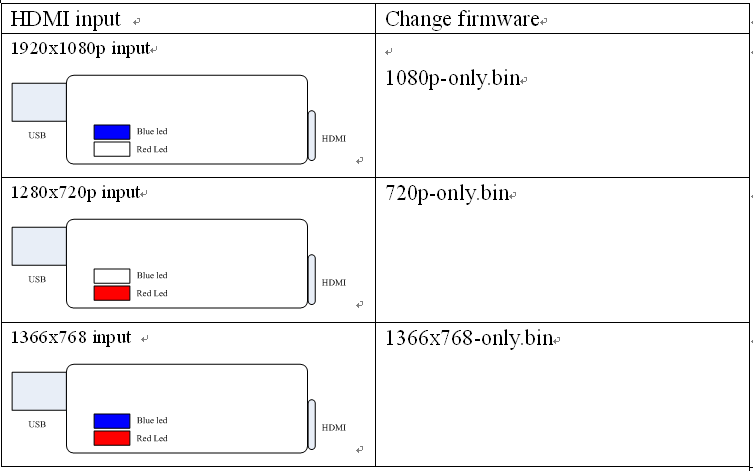
Why change firmware? How to change firmware?


How to Change the firmware?


Why change firmware?

Most of software can not choose the uvc resolution by itself.

For example: SKYPE, Google+ hangouts

We can upgrade the firmware to fix it.


SKYPE or google hangouts always get the 1280x720 uvc output.


if your hdim source is 1920x1080p, skype / google hangouts get 1280x720 resolution and it will no video.


you can change the firmware what you need by the led detect information.


2014年9月3日 星期三

How to install intel USB 3.0 xHCI Driver for Windows 7 driver


1. itnel i3 , i5 , i7

ntel® USB 3.0 eXtensible Host Controller Driver contains support for the following Intel® Chipsets and Intel® Processors:
· Intel® 7 Series/C216 Chipset Family
· 3rd generation Intel® Core™ Processor Family
· 2nd generation Intel® Core™ i3 Processor
· 2nd generation Intel® Core™ i5 Processor
· 2nd generation Intel® Core™ i7 Processor
· 2nd generation Intel® Core™ i7 Extreme Processor

The following Operating Systems are supported:
Intel® 7 series chipset family:   - Windows 7* Operating System (both 32-bit and 64-bit versions).
Intel® C216 series chipset family:   - Windows 7 Operating System (both 32-bit and 64-bit versions).
   - Windows Server 2008 R2* 64-bit Operating System.

The Intel® USB 3.0 eXtensible Host Controller Driver Installer "Setup.exe" will install the following drivers and application on the system:
· Intel® USB 3.0 eXtensible Host Controller Driver
· Intel® USB 3.0 Root Hub Driver
· Intel® USB 3.0 Host Controller Switch Driver
· Intel® USB 3.0 Monitor


2.

Intel® USB 3.0 eXtensible Host Controller Driver contains support for the following Intel® Chipsets/Processors:
      4th generation Intel® Core™ Processor Family
      Intel® 8 Series/C220 series Chipset Family    
      4th Generation Intel® Core™ Processor U-Series Platform I/O

The following Operating Systems are supported:

Intel® 8 Series Chipset Family / 4th Generation Intel® Core™ Processor U-Series Platform I/O:   - Windows 7* Operating System (both 32-bit and 64-bit versions).

Intel® C220 series chipset family:
   - Windows 7 Operating System (both 32-bit and 64-bit versions).
   - Windows Server 2008 R2* Operating System.
   - Windows Small Business Server 2008* Operating System.

The Intel® USB 3.0 eXtensible Host Controller Driver Installer "Setup.exe" will install the following drivers and application on the system:
· Intel® USB 3.0 eXtensible Host Controller Driver
· Intel® USB 3.0 Root Hub Driver
· Intel® USB 3.0 Host Controller Switch Driver
· Intel® USB 3.0 Monitor

2026最新企劃:手機豎屏全螢幕投影器最終版

  📱 我開發的「手機全螢幕投影器最終版本」:解決螢幕比例困境與多功能整合技術 我對手機投影到電視這件事情的熱衷,其實有個轉變的過程 。在 2022 年底,我根本不看好這塊市場 ,因為我覺得這只是個消費性的東西,沒什麼好做的 。畢竟,Apple 原廠的 Lightning ...