顯示具有 android 標籤的文章。 顯示所有文章

2021年10月16日 星期六

BU110 hdmi擷取器用TYPE C 安卓手機讓外接DV 攝影機做臉書直播的限制條件開箱文

擷取器分別用iPhone ( iCapture 擷取卡+ medialink live )和安卓手機(FEBON168 和圓剛BU110 擷取器+ camerafi live)連接攝影機實況直播比較


目前市面上有一些廠商,
宣稱他的USB3.0 HDMI擷取器可以輸出1920x1080p 60fps,可以在手機直播


請注意看這一句話!
第一句話:可以輸出1920x1080p 60fps

   ->這是指,這個擷取器插入USB3.0 的電腦,最高可以到 1920X1080P 60FPS

第二句話: 可以在安卓手機直播

但是這兩句話合在一起,
就會讓人誤會幻想,他的擷取器在手機直播可以到1920x1080p 60fps

各位觀眾朋友!!!
能夠擷取1920x1080p 60fps,只能在電腦下,才有機會達成
在手機的應用,都是USB2.0模式,不可能1920x1080p 60fps
不要被宣傳術語給迷幻了!


我先告訴大家結論~~~
不管你在真正的USB3.0的TYPE C 手機直播,仍然無法使用
必須要降到 USB2.0 模式才能使用!!

USB2.0模式,最後直播就是, 1280X720P 30FPS MJPG 頂多這樣而以


如何選擇影像擷取器在安卓手機或iPhone手機或電腦OBS Studio直播


目前除了在電腦OBS Studio定點直播外,
還可以選擇安卓手機或iPhone連接擷取卡做行動走動式直播


目前測試行動式直播,仍以連接iPhone的直播效果最好
主要是因為APP處理軟體的問題

擷取卡本身可以到1080p 60fps ,但是安卓手機的樣式各式各樣
所以,為了滿足大部分手機直播需求,直播的效能就必須要有所妥協

iPhone iPad就沒有這樣問題
因為他是封閉系統,硬體和iOS的一致性比較高
所以,直播的效能會比安卓好


安卓手機直播


iPhone手機 iPad直播

電腦OBS Studio直播

軟體 APK: camerafi live
直播教學 
APP: medialink live
直播教學
AP: WINDOWS / MAC OBS
直播教學
擷取卡選擇 USB2.0 FEBON168
免驅擷取卡


USB3.0 FEBON180
免驅擷取卡


FEBON iCapture HDMI 
擷取卡

USB2.0 FEBON168
免驅擷取卡

USB3.0 FEBON180
免驅擷取卡

USB3.0 F E B O N169
免驅擷取卡 (轉場使用)

USB3.0 F E B O N179
免驅擷取卡(轉場使用)
相容度 並非每一支安卓手機都能連接uvc hdmi擷取卡

通常,聯發科中低階晶片無法使用

相容列表
iphone硬體相容是iphone6以後(含iPHONE SE)

iPad硬體相容是iPad air以後
iOS 是ios10.3 以後
USB3.0高速模式:
win10+ intel CPU + USB3.0 XHCI

最高可到1920x1080 60fps YUV

USB2.0 一般模式
任何電腦
最高可到1920x108 30fps MJPG
直播設定 自動直播

1.自動 臉書直播

2.自動 Youtube 直播

3自動Twitch 直播
自動直播

1.自動 臉書直播

2.自動 Youtube 直播

3自動Twitch 直播
需要參數設定,
對於初學者有門檻

直播教學
邊使用邊充電 1.micro usb
手機無法邊使用邊充電

2.type C手機 :
大部分高階的type C手機可邊使用邊充電
邊使用邊充電 邊使用邊充電

直播流暢度 不流暢


非常流暢
非常流暢
直播影像品質 差
bit rate 不高


高
bit rate最高可調整到10000 kbps
高
bit rate最高可調整到10000 kbps
直播解析度 免費版本:1280x720p

付費版本:1920x1080p

(臉書直播最高到720p)
最高到1920x1080p 30fps

(臉書直播最高到720p)
解析度可到4k

(臉 書直播最高到720p)
直播影像形式 橫的直播
橫的直播
直的或橫的直播

直播特效 付費版本

1.子母畫面

2.LOGO
無 1.子母畫面
2.跑馬燈
3.logo
4去背

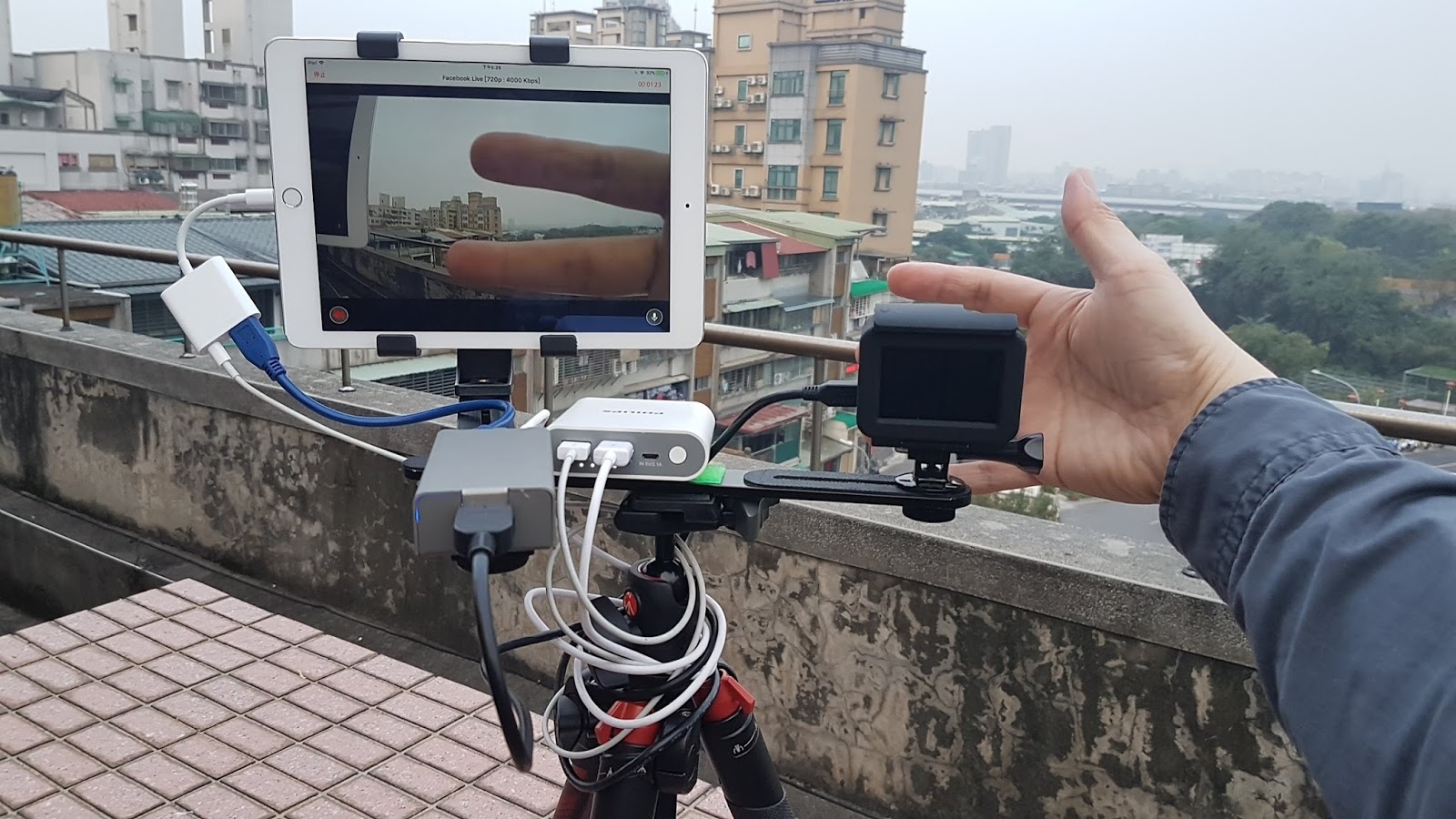
GoPro hero be live streaming with phone

You can let your GoPro hero 5 hero 6 be as a video source for live streaming use

eg:  live streaming for facebook live,  youtube live and Twitch live


I will introduce two connect method

1.  WIFI  connect 

    it is just up to 480p @ low bit rate


 2. Wire connect


   By HDMI wire connect
    it is up to 1080p 30fps  @ high bit rate


2020年9月6日 星期日

全世界第一個android app 可以用手機直播 Ricoh theta 360 度直播 (360直播)


這一年來,一些宣稱可以用手機360度直播,都是騙人的!

假的!
業障太重,都騙很大!

比如LUNA
行銷做的好,
在國外募資網已經募到了1000萬台幣 宣稱8/15可以出來,

突然八月中旬來一封信,說現在正在過認證....XXX%&'$$#
講白話文就是,現在弄不出來,要大家再等等


硬體都弄不來,更別說直播app

按照募資網白紙黑字的說法,應該要退款

延遲了,又不給退錢,真的是騙很大

人家真的會以為台灣是詐騙集團之島,台灣之恥

https://www.indiegogo.com/projects/luna-a-360-camera-for-everyone-gadgets-technology


我現在只相信眼睛看到的東西!

如果有人說,快出來快出來,那都是騙人的!

To see is to believe


全世界第一個APP可以讓360度攝影機透過手機直播出去,終於出來了

android app :  "camerafi Live"

連接的方式如下

 Ricoh theta -> USB  輸出 -> OTG 線 -> android 手機


2020年7月28日 星期二

2019年7月25日 星期四

SONY Xperia Z3 D6653 display usb uvc device ( USB UVC capture grabber card / USB UVC camera)


SONY Xperia Z3 D6653  is Android 5.0.2 OS.


You can connect the USB OTG line and be with  USB UVC device.


Connect  UVC HDMI capture card  -> become hdmi LCD Monitor

Connect UVC SDI capture card -> become SDI LCD Monitor

Conect  UVC CVBS capture card ->  become CVBS LCD Monitor.


SONY Xperia Z3 can display the uvc device video


I use the device as below


1.  USB2.0 FEBON264 UVC H.264/MJPG/ YUV  CVBS grabber card


   Although this grabber card have h.26¥64 hardware stream, it still be output mjpg /yuv in the android

 The video source is  CVBS CCTV CAMERA.    


2019年7月3日 星期三

ASUS PadFone display usb uvc device ( USB UVC capture grabber card / USB UVC camera)


ASUS PadFone nfinity T004  is Android 4.2.2 OS.


You can connect the USB OTG line and be with  USB UVC device.


PadFone can display the uvc device video


I use the device as below


1.  USB2.0 FEBON264 UVC H.264/MJPG/ YUV  CVBS grabber card


   Although this grabber card have h.26¥64 hardware stream, it still be output mjpg /yuv in the android

 The video source is  CVBS CCTV CAMERA.    


2019年4月15日 星期一

[NO root ] NEXUS7 2013 vbersion /Samsung with Android 4.4.2 (Android 4.4.3) can let UVC device work

For android application, NO Refund!!! 

I can not guarantee all of android. 

If you want to buy, you must take the risk that it can not work on android /linux.


You can do the simple experiment by yourself.

There three apk on the google play.

 You can try these  apk


step1: download APK as below 


 CameraFi - USB Camera / Webcam

This apk is the best one what I test.


https://play.google.com/store/apps/details?id=com.vaultmicro.camerafi&hl=zh-TW


support list


UsbWebカメラ

 https://play.google.com/store/apps/details?id=com.serenegiant.usbwebcamera

EarlySail USB WebCam

https://play.google.com/store/apps/details?id=com.earlysail.uvc.usb.webcam


USB CAMERA Trial

https://play.google.com/store/apps/details?id=infinitegra.trial.usbcamera


step2: plug the usb uvc webcam into your android.


if uvc webcam can work on your android with this apk, FEBON UVC device card will also work

For android application, NO Refund!!! 

I can not guarantee all of android. 

If you want to buy, you must take the risk that it can not work on android /linux.


USB2.0 FEBON100 UVC CVBS

GRABBER CARD
USB2.0 FEBON168


UVC HDMI GRABBER CARD

USB2.0 FEBON188

UVC SDI GRABBER CARD

CameraFi - USB Camera / Webcam


1. support 1280x720p

2. support yuv / mjpg

3. it can read the uvc output of uvc device

4. support bulk mode uvc device

4. record !

samsung note3 NEO + android 4.3 samsung note3 NEO + android 4.3

 HTC Desire 820 + android4.4.4
samsung note3 NEO + android 4.3

 HTC Desire 820 + android4.4.4
UsbWebカメラ


NEXUS 7 2013  Android 4.x 

Samsung S3+ Android4.3

Samsung note 2 +Android43


HTC one M7+ Android4.4.3

NEXUS7 2013+ANDROID4.4.3


SONY Z3 +Andorid5.02
(FEBON264 CVBS grabber card)


NEXUS 7 video demo

Samsung note3 demo

Samsung S5 demo

Samsung Tab pro demo

Samsung S3+Android4.3

Samsung note 2+ android43


HTC one M7+ Android 4.4.3


SONY Z3+ android5.02


NEXUS7 2013+ANDROID4.4.2 NO ROOT 

SONY Z3+ android5.02
 
EarlySail USB WebCam


USB Camera Trial


1. the trail version is just 60sec.

2. support bulk  mode device


Samsung Note3 Neo+ 4.3


Samsung note3 Neo + android 4.3

Dashcam


1. NEXUS7 2013+ Android4.3 DO NOT root


2. NEXUS2013+ Android4.4 Need root

3. support bulk mode device

NEXUS7 2013+ android 4.3


NEXUS7 2013+ android4.3

NEXUS7 2013+ANDROID4.3 no root


NEXUS7 2013+android4.3 no root

NEXUS7 2013+android4.3 no root
NEXUS7 2013+ANDROID4.3 no root


APK: UsbWebカメラ

GOOGLE PLAY:


 https://play.google.com/store/apps/details?id=com.vaultmicro.camerafi&hl=zh-TW


https://play.google.com/store/apps/details?id=com.serenegiant.usbwebcamera


APK:

EarlySail USB WebCam

Google play:

https://play.google.com/store/apps/details?id=com.earlysail.uvc.usb.webcam


APK: USB CAMERA Trial

Google play:

https://play.google.com/store/apps/details?id=infinitegra.trial.usbcamera


Android machine:

Nexus7(2012, Android4.4.2) /
Nexus5(Android 4.4.2 & 4.4.3) /
Galaxy S3(SC-06D, Android 4.1.2)


UVC Device:

FEBON168 USB UVC HDMI grabber card

FEBON188 USB UVC SDI grabber card


 you can isntall " UsbWebカメラ" apk.  /USB CAMERA Trial /EarlySail USB WebCam

These apk ("UsbWebカメラ"  )can let your uvc webcam work without root under Android4.3 / Android4.4.2 /Android4.4.3 /Android4.4.4


So,

Without root, apk " UsbWebカメラ" can let uvc webcam work on Android4.4.2


CASE1:

NO ROOT, 

FEBON168 USB UVC HDMI grabber card work on NEXUS7 2013 version with android4.4.2


FEBON168 USB UVC HDMI grabber card work on NEXUS7 2013 version with android4.4.3


FEBON100 USB UVC CVBS grabber card work on NEXUS7 2013 version with android4.4.3


2018年3月15日 星期四

Double head panoramic (panono ball like) 360 degree fisheye hybird USB / WIFI camera


   IN STOCK NOW!!!!


Hybrid WIFI/USB FEBON368 Fisheye Camera HD is a hybrid USB UVC & WIFI AP module

controlled by a hardware switching key.

It mainly consists of two PCB boards, the one is fish-eye camera and its size is 40mmx45mm.


 Two ”back to back" FEBON368 Fisheye panoramic will become panono ball like camera.


The view angle will be 360 degree. 


\


2018年3月1日 星期四

FEBON368 hybird USB / WIFI Fisheye camera user manual


FEBON368 fisheye camera module is hybrid USB UVC & WIFI AP mode by switch key.

There are 4 fisheye hardware base modes as below.


1. 360 degree mode:

2. Wide angle lens distortion compensation

3. ePTZ  Mode .

4. Video conference mode.


A.  FEBON368 fisheye Camera module hardware key


The right side:


2016年12月30日 星期五

[NO root required] Android 4.3 version has embeded UVC driver.


For android application, NO Refund!!! 

I can not guarantee all of android. 

If you want to buy, you must take the risk


1. UVC device as video source and broadcast into Youtube live, facebook live and ustream


UVC device - >>OTG line ->>android phone ->> Broadcast into Youtube,  ustream and facebook


The more information is as below link

use Android phone as Super low cost broadcast box ( broadcaster pro box.)


HDMI INPUT broadcaster box=
 FEBON168 UVC HDMI GRABBER
         +
   Android phone
         +
   apk "cameraFi Live"
CVBS INPUT Broadcaster box =
 FEBON264 UVC CVBS GRABBER
         +
   Android phone
         +
   apk "cameraFi Live"
SDI INPUT Broadcast box=
 FEBON188 UVC SDI GRABBER
         +
   Android phone
         +
   apk "cameraFi Live"


REAL DEMO


Real demo


Real demo


SAVE on Youtube


SAVE on Youtube


Save on Youtube


2. UVC device display on Android platform
You can do the simple experiment by yourself.

There three apk on the google play.

 You can try these  apk


step1: download APK as below 


 CameraFi - USB Camera / Webcam

This apk is the best one what I test.


https://play.google.com/store/apps/details?id=com.vaultmicro.camerafi&hl=zh-TW


support list


UsbWebカメラ

 https://play.google.com/store/apps/details?id=com.serenegiant.usbwebcamera

EarlySail USB WebCam

https://play.google.com/store/apps/details?id=com.earlysail.uvc.usb.webcam


USB CAMERA Trial

https://play.google.com/store/apps/details?id=infinitegra.trial.usbcamera


step2: plug the usb uvc webcam into your android.


if uvc webcam can work on your android with this apk, FEBON UVC device card will also work


USB2.0 FEBON100 UVC CVBS

GRABBER CARD
USB2.0 FEBON168


UVC HDMI GRABBER CARD

USB2.0 FEBON188

UVC SDI GRABBER CARD

CameraFi - USB Camera / Webcam


1. support 1280x720p

2. support yuv / mjpg

3. it can read the uvc output of uvc device

4. support bulk mode uvc device

4. record !

samsung note3 NEO + android 4.3


ASUS PadFone infinity T004 + android4.2.2
samsung note3 NEO + android 4.3

 HTC Desire 820 + android4.4.4


ASUS PadFone infinity T004 + android4.2.2
samsung note3 NEO + android 4.3

 HTC Desire 820 + android4.4.4


 ASUS PadFone infinity T004 +android4.2.2
UsbWebカメラ


NEXUS 7 2013  Android 4.x 

Samsung S3+ Android4.3

Samsung note 2 +Android43


HTC one M7+ Android4.4.3

NEXUS7 2013+ANDROID4.4.3


NEXUS 7 video demo

Samsung note3 demo

Samsung S5 demo

Samsung Tab pro demo

Samsung S3+Android4.3

Samsung note 2+ android43


HTC one M7+ Android 4.4.3


NEXUS7 2013+ANDROID4.4.2 NO ROOT
EarlySail USB WebCam


USB Camera Trial


1. the trail version is just 60sec.

2. support bulk  mode device


Samsung Note3 Neo+ 4.3


Samsung note3 Neo + android 4.3

Dashcam


1. NEXUS7 2013+ Android4.3 DO NOT root


2. NEXUS2013+ Android4.4 Need root

3. support bulk mode device

NEXUS7 2013+ android 4.3


NEXUS7 2013+ android4.3

NEXUS7 2013+ANDROID4.3 no root


NEXUS7 2013+android4.3 no root

NEXUS7 2013+android4.3 no root
NEXUS7 2013+ANDROID4.3 no root


ddddd


CASE 1: [no root] NEXUS7 2013 version + Android 4.3


NO root Required!!!

JUST android 4.3 version only!!!!!!


condition:
1. New version NEXUS 7 2013

2. Android 4.3 

3.download free apk " dashcam" from Google Play. 


DEMO1 :
FEBON100 UVC CVBS GRABBER CARD+ NEXUS7 2013+ android 4.3 APK "Dashcam"


DEMO2:
FEBON168 UVC HDMI grabber card+ NEXUS7 2013+ android4.3 + APK "Dashcam"


CASE2: [No root] NEXUS7 2013 version + Android 4.4.2


condition:
1. android machine:

Nexus7(2012, Android4.4.2) /
Nexus5(Android 4.4.2 & 4.4.3) /
Galaxy S3(SC-06D, Android 4.1.2)

2.download free apk  "UsbWebカメラ"  or EarlySail USB WebCam


The link as below  is video demo that is under  [No root] NEXUS7 2013 version + Android 4.4.2

VIDEO DEMO:


http://febon.blogspot.com/2014/07/no-root-nexus7-2013-vbersion-with.html


------------------------------------------------------------------------------------------------------------------------------------


CASE 1 / CASE 2   VIDEO DEMO


New NEXUS 7 had embedded UVC driver on Android 4.3 OS.


That means uvc webcam can directly plug into your Android 4.3

And it will also work without "ROOT"


TEST UVC DEVICE

Device 1.FEBON100 USB UVC CVBS (AV) capture card

Device 2. FEBON168 USB UVC HDMI Capture card

Device3. FEBON188 USB UVC SDI capture card

Devcie4. USB microscope


STEP1: Plug your UVC USB camera into your Android by " OTG USB line"

I use " FEBON168 UVC USB HDMI grabber card " as uvc camera

http://febon.blogspot.com/2013/10/febon168-uvc-usb-hdmi-grabber-card-user.html


STEP2: To make sure if it is Android 4.3 version ( android 4.3 is NO ROOT)

              if android4.4.2, you need to "root" first.
           
               how to root??

               https://www.youtube.com/watch?v=dUHcnX5Ri_c


STEP3: download  APK  "dashcam" from Google play

https://play.google.com/store/apps/details?id=com.droidperception.dashcam


STEP4: open dashcam and choose the resolution

   The default is 320x240.

   For my usb device, 1920X1080 CAN NOT work.  1280x720 work fine~


The video demo clip are as below.


CASE A:  FEBON100 UVC USB grabber card.


   FEBON100 UVC CVBS grabber card user manual is as below

                 http://febon.blogspot.com/2012/02/1.html


This application is for car backup camera /  Snake camera / endoscope


BackUp camera ( Rear View) directly connect Nexus 7


Multimedia box


endoscope + FEBON100 UVC grabber card


2026最新企劃:手機豎屏全螢幕投影器最終版

  📱 我開發的「手機全螢幕投影器最終版本」:解決螢幕比例困境與多功能整合技術 我對手機投影到電視這件事情的熱衷,其實有個轉變的過程 。在 2022 年底,我根本不看好這塊市場 ,因為我覺得這只是個消費性的東西,沒什麼好做的 。畢竟,Apple 原廠的 Lightning ...