

I use two uvc hdmi capture card to do keyer effects
| USB3.0 FEBON180 UVC HDMI capture card | USB3.0 FEBON169 UVC HDMI captuer card |
 |  |
FEBON180 embedded audio sampling ic we suggest you can use this grabber card be as audio source | FEBON169 DO NOT embedded audio sampling ic we DO NOT suggest use it be as audio source you need change the audio sampling rate in the windows audio center |
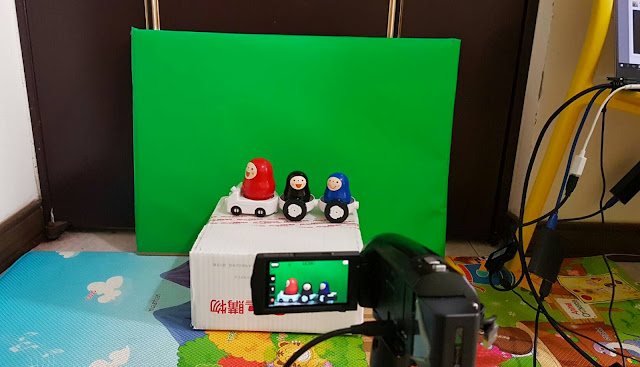
Prepare the green screen and camera
DO NOT use Canon DSLR:
it do not have audio . it just video.
its hdmi output do not support " clean hdmi "
it will show the battery icon, focus icon and etc

I use SONY HDR-PJ675. you also can use anther DV like SONY HDR-CX450
OBS studio setting
Youtube demo
STEP1: setup scenes
green video source is from FEBON180
background (blue video) video source is from FEBON169
180-VIDEO: to get FEOBN180 video device named HDMI GRABBER
180-audio: to get FEBON180 audio device named HDMI GRABBER
169-video : to get FEBON169 video device named FULLHD webcam

STEP2: keyer effects
click mouse right icon " 180-VIDEO" add filters

STEP3: add color key


STEP5:finish the keyer effects

STEP6:start live streaming


沒有留言:
張貼留言